

Deploy and operate Roxy-WI 9.2
Roxy-WI 10.0 also offers a Podman Quadlet controller profile with encrypted secrets, SQLite and local HTTPS. To manage remote Docker/Podman proxies from the GUI, use the separate managed containers guide.
Last updated: · Applies to Roxy-WI 9.2 and later.
Deploy Roxy-WI, a web GUI for managing HAProxy and NGINX servers, in Kubernetes with the official Helm chart or on a host with Docker Compose or Linux packages. The chart uses SQLite by default for one Web replica; an external MariaDB/MySQL database is optional for that setup and required for multiple Web replicas. RabbitMQ, persistent storage and HTTPS must be provided separately.
Deployment choices
Roxy-WI 9.2 retains the deployment architecture introduced in 9.1: Linux packages, Docker Compose and Kubernetes with separate Web, Scheduler, Service Events and Operations processes. Use the same database, application storage and credential encryption key across these roles.
Choose Linux packages for a host installation, the local quick start below for evaluation, or Compose/Helm for a container deployment. Installing the application does not activate a subscription. See plans and feature availability for managed services, OIDC and Change Center.
Try locally with HTTPS
Install Git, Python 3.10 or newer, Docker with Linux containers and Docker Compose 2.24.4 or newer. Keep local port 8443 free and allow the build to download dependencies. Run:
git clone https://github.com/roxy-wi/roxy-wi.git
cd roxy-wi
python3 docker/quickstart.py start
python3 docker/quickstart.py password
On Windows, use py -3 in place of python3 if needed. Open https://localhost:8443 and sign in as admin with the generated password. The local HTTPS certificate initially has an untrusted issuer; accept it for this local evaluation. The launcher does not change your machine's trust store.
The launcher builds the checkout, runs migrations and starts all four roles, RabbitMQ and the HTTPS proxy in the separate roxywi-quickstart Compose project. It publishes only the proxy on loopback.
python3 docker/quickstart.py status
python3 docker/quickstart.py logs
python3 docker/quickstart.py stop
stop preserves volumes and docker/.env.quickstart; start reuses them. Keep that file with the database because it holds the encryption key. The local stack has no demonstration servers: add SSH credentials and a test server reachable from the Docker network. Inside a container, localhost refers to that container.
Deploy with Docker Compose
The repository contains MariaDB and SQLite manifests. These build the application from your checkout. The following commands use docker/docker-compose.yml (MariaDB); keep the same project name, manifest and environment file for later commands.
- Copy
docker/.env.exampletodocker/.env. Replace every placeholder with unique secrets, including an application secret of at least 32 characters. Keep the file private and out of version control. - Generate a Fernet key for
ROXYWI_SECRET_PHRASEwith the command below. For an existing database, preserve its current key instead. - Set
ROXYWI_PUBLIC_URLto the external HTTPS origin without a trailing slash. Put Web behind an HTTPS reverse proxy, restrict published port 8080 to that proxy and configure proxy trust for your network. Authentication cookies require HTTPS. - Build and start the stack; migration must finish successfully before the application roles start.
python3 -c "import base64, os; print(base64.urlsafe_b64encode(os.urandom(32)).decode())"
docker compose --project-name roxy-wi --env-file docker/.env -f docker/docker-compose.yml up --build --detach --wait --wait-timeout 300
docker compose --project-name roxy-wi --env-file docker/.env -f docker/docker-compose.yml exec -T web cat /var/lib/roxy-wi/bootstrap-admin-password
Log in as admin using the initial password, then change it. The password file does not track later changes. Named volumes retain application files, database data and RabbitMQ state. Do not remove volumes when stopping an installation you intend to keep. Bind mounts must be writable by UID/GID 10001, used by the default application image.
Deploy the Roxy-WI HAProxy management GUI with Helm
Can I deploy a HAProxy management GUI in Kubernetes?
Yes. The official Roxy-WI Helm chart runs the management interface and its background workers in Kubernetes. Roxy-WI connects to the managed HAProxy, NGINX, Apache and Keepalived servers over SSH. The chart installs Roxy-WI; it does not install a Kubernetes Ingress Controller or the proxy servers you will manage.
Install the published Helm chart directly from oci://ghcr.io/roxy-wi/roxy-wi-charts. The examples pin chart version 9.1.0, which uses ghcr.io/roxy-wi/roxy-wi:9.1.0 by default. A source checkout, local image build and helm repo add are not required. The chart source remains available for custom deployments.
Use Helm with OCI support (Helm 3.8 or later; CI checks Helm 3.21.3 and 4.2.3). The chart declares Kubernetes 1.23 or later. Prepare RabbitMQ, persistent storage and an HTTPS ingress controller with a TLS certificate. The chart deploys Web, Scheduler, Service Events, Operations and a migration Job; it does not install RabbitMQ or MariaDB/MySQL.
Does the Helm chart require an external database?
No. SQLite is the default for one Web replica. External MariaDB/MySQL is optional with one Web replica and required with multiple Web replicas. RabbitMQ is required in both cases and is not installed by this chart.
SQLite with one Web replica and a 10 GiB ReadWriteOnce volume is the default. For multiple Web replicas, use an external MariaDB/MySQL database and ReadWriteMany storage. All application roles and the migration Job mount the same data volume. ReadWriteOnce requires compatible placement on one node; for pods spread across nodes, provide ReadWriteMany storage with working advisory file locks. Storage must be writable by UID/GID 10001.
Prepare values
Download the defaults for the exact chart version. The commands below use a POSIX shell; store the values file privately because it will contain secrets.
umask 077
helm show values oci://ghcr.io/roxy-wi/roxy-wi-charts --version 9.1.0 > roxy-wi-values.yaml
For a new installation, generate a random application secret and a Fernet encryption key with these commands. Copy the outputs into config.main.secret_key and config.main.secret_phrase, respectively. When connecting an existing database, preserve its original keys.
python3 -c "import secrets; print(secrets.token_hex(32))"
python3 -c "import base64, os; print(base64.urlsafe_b64encode(os.urandom(32)).decode())"
The following overrides illustrate external MariaDB/MySQL, RabbitMQ, shared storage and HTTPS. Replace the hosts and usernames, fill every empty secret, select a storage class that supports ReadWriteMany and set the IngressClass for your cluster. Provision the database and broker account/vhost first. The TLS Secret must already exist in the release namespace, or be supplied by your certificate controller.
config:
  main:
    secret_key: ""       # Generated application secret: at least 32 characters
    secret_phrase: ""    # Generated Fernet key; keep it with database backups
    public_url: https://roxy-wi.example.com
  database:
    engine: mysql
  mysql:
    enable: 1
    mysql_host: mariadb.database.svc.cluster.local
    mysql_port: 3306
    mysql_db: roxywi
    mysql_user: roxy-wi
    mysql_password: ""   # Password of the existing database account
rabbitmq:
  host: rabbitmq.messaging.svc.cluster.local
  port: 5672
  vhost: /
  username: roxy-wi
  password: ""           # Password of the existing broker account
persistence:
  accessModes: [ReadWriteMany]
  storageClass: ""       # Select a storage class supporting ReadWriteMany
  size: 10Gi
ingress:
  enabled: true
  className: ""          # Your controller's IngressClass
  hosts:
    - host: roxy-wi.example.com
      paths:
        - path: /
          pathType: Prefix
  tls:
    - secretName: roxy-wi-tls
      hosts: [roxy-wi.example.com]
For SQLite, retain config.database.engine: sqlite and web.replicaCount: 1 instead of the MySQL settings above. Keep config.main.public_url equal to the external HTTPS origin without a trailing slash. Authentication cookies require HTTPS; an HTTP-only port-forward is not a complete login setup.
| Setting | How it is used |
|---|---|
image.repository / image.tag | Defaults to the published Roxy-WI image; an empty tag uses the chart's appVersion. Override both only when selecting a compatible custom image. |
existingConfigSecret | An existing Secret in this namespace containing the key roxy-wi.cfg. It replaces the entire generated configuration, including keys, database settings and public URL; config.* values are not merged into that file. |
rabbitmq.existingSecret | With rabbitmq.environmentOverride: true, supply a Secret containing ROXYWI_RABBITMQ_HOST, ROXYWI_RABBITMQ_PORT, ROXYWI_RABBITMQ_VHOST, ROXYWI_RABBITMQ_USER and ROXYWI_RABBITMQ_PASSWORD. When this Secret is selected, the chart does not generate these environment values from rabbitmq.*. Set environmentOverride: false only when managing broker settings through the application database/configuration. |
persistence.existingClaim | Use an existing PVC instead of creating one. Set persistence.accessModes to match its actual access mode; the chart uses this value for validation and worker placement. |
web.replicaCount | Defaults to one. More than one requires MariaDB/MySQL and ReadWriteMany storage. Keep one Scheduler. |
Render and install
Review the rendered resources before installing. Rendered YAML and Helm release data can contain secrets; keep them private. These commands use release name roxy-wi and namespace roxy-wi. For an existing release, complete the Helm update procedure first.
helm template roxy-wi oci://ghcr.io/roxy-wi/roxy-wi-charts \
  --version 9.1.0 --namespace roxy-wi --values roxy-wi-values.yaml > roxy-wi-rendered.yaml
helm upgrade --install roxy-wi oci://ghcr.io/roxy-wi/roxy-wi-charts \
  --version 9.1.0 --namespace roxy-wi --create-namespace \
  --values roxy-wi-values.yaml --wait --wait-for-jobs --timeout 10m
kubectl --namespace roxy-wi get pods,jobs,pvc,service,ingress -l app.kubernetes.io/instance=roxy-wi
The migration Job initializes the schema; application init containers wait for schema readiness. Check that the Job completed and each role is ready. On a fresh installation with the default empty bootstrapAdminPassword, read the generated initial password and sign in as admin at your HTTPS URL:
kubectl --namespace roxy-wi exec deployment/roxy-wi-web -- cat /var/lib/roxy-wi/bootstrap-admin-passwordIf you set bootstrapAdminPassword, use that initial password instead; it must contain at least 12 characters. Change the password after first login. The bootstrap file does not track later password changes. For custom release/resource names, use the Web Deployment name from the installed resources.
Processes, health and queued work
| Role / command | Responsibility |
|---|---|
python3 roxy_wi.py web | Run the Web interface and API with Gunicorn. |
python3 roxy_wi.py scheduler | Queue scheduled work, retries, notifications and reconciliation. Run exactly one Scheduler; do not enable it inside Web workers. |
python3 roxy_wi.py service-events | Consume service events and update recorded worker/service state. |
python3 roxy_wi.py operations | Execute queued work and store progress/results, including service installation, backups, certificates and Change Center actions. |
python3 roxy_wi.py migrate | Apply database migrations and exit before starting application roles. |
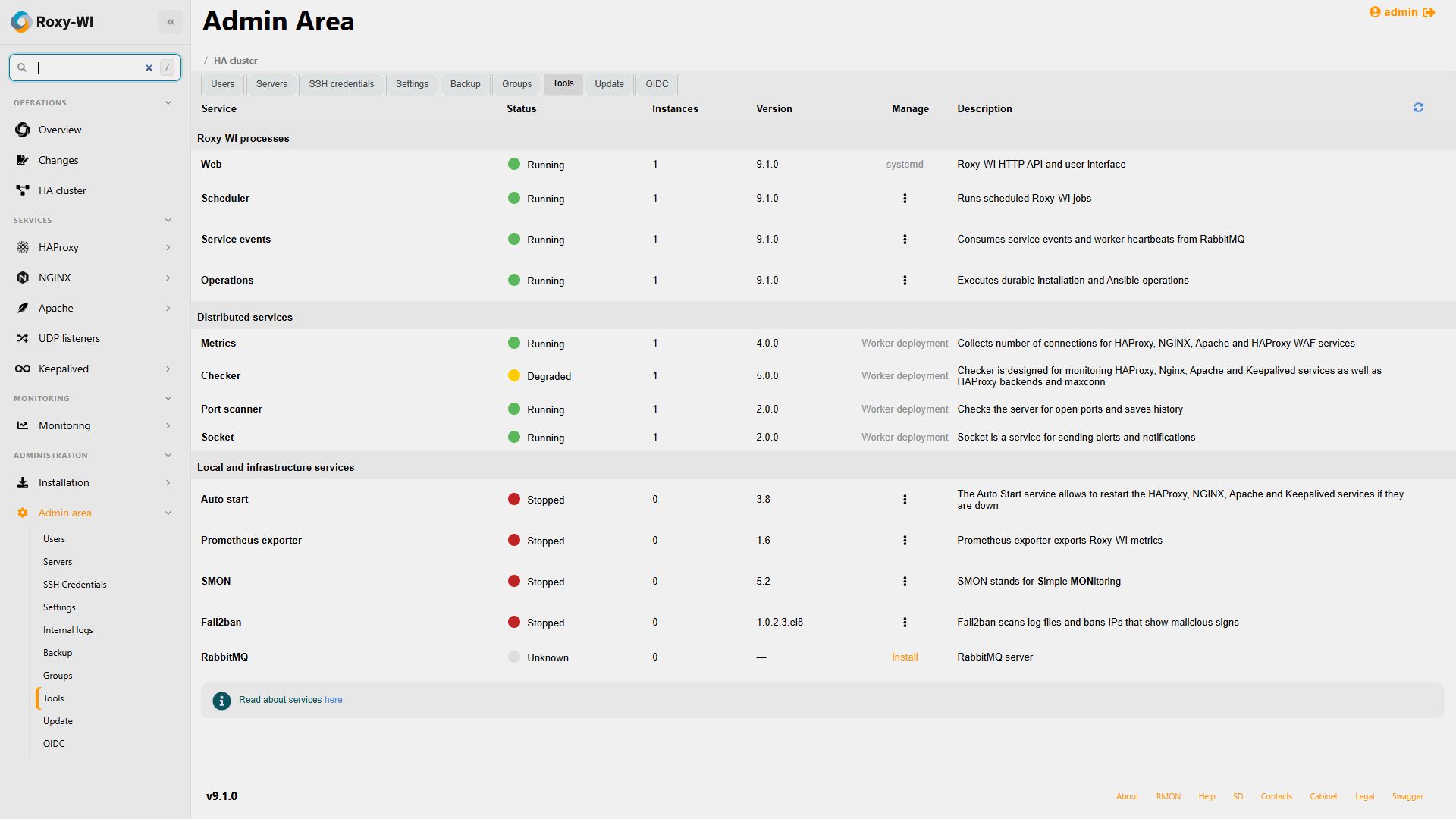
Packages and container manifests supervise these roles. RabbitMQ carries background work. A Web restart does not discard queued operations. Overview and Admin Tools show runtime versions, replica counts, assignments and stale heartbeats; container processes are managed through Compose or Kubernetes.
docker compose --project-name roxy-wi --env-file docker/.env -f docker/docker-compose.yml ps
docker compose --project-name roxy-wi --env-file docker/.env -f docker/docker-compose.yml logs --tail 100 web scheduler service-events operations
docker compose --project-name roxy-wi --env-file docker/.env -f docker/docker-compose.yml exec -T operations python3 roxy_wi.py healthcheck --role operations --check ready
Web exposes /health/live and /health/ready. Probe background roles separately with their role name; Web readiness alone does not prove that scheduled work can run. If operations remain queued, check RabbitMQ and Operations; if no scheduled work appears, check Scheduler, next run/retry, timezone and migration status. Use Internal logs and Live for diagnosis.
Worker diagnostics in 9.2
On Overview or Admin area → Tools, click a worker's status to open Service diagnostics. Refresh the snapshot to read its current runtime version, process start, last heartbeat, expiry, task count and capacity. An error includes a reason, recovery guidance, technical details and a link to the affected server's settings when available.
Workers are grouped by instance identity. Previous runs retains earlier runs without counting them as extra active instances. Other active processes identifies overlapping runs whose heartbeats have not expired. Check the actual deployment before stopping anything; independent replicas need distinct instance IDs. An overlap immediately after a restart can remain visible until the old heartbeat expires.
| State | What to do |
|---|---|
| Starting / Running | Wait for the next heartbeat during startup. Running means the worker reports no execution errors; inspect assignments to confirm that it has work. |
| Running with errors | Read the reported reason. Check target connectivity, DNS, TLS or credentials from the worker host and use the linked server settings. |
| Finishing tasks / Stopped | Check the intended shutdown or rollout. If the worker should run, manage it through its actual service manager. |
| Stale / no heartbeats | Check the process on the worker host, RabbitMQ and the Service Events consumer. Errors from an expired heartbeat describe the last report, not a verified current failure. |
Checker and Metrics may run on another host. Their Overview controls use registered active worker availability; installing a package on the Web host is not required. Metrics pages also retain access to historical charts for registered workers after collection stops. A visible graph does not prove that samples are current.
Admin Tools lifecycle actions control local package/systemd services. Remote workers and containers must be managed on their own host or through Compose/Kubernetes. If a local command fails, inspect its error and logs; a requested restart is not proof of a successful restart.
Use the Checker and Metrics guides for worker logs and assignments. A worker with no assignments may need collection enabled, an active subscription or the next Scheduler reconciliation.
Restart and update
To restart the installed Compose stack without changing its image or environment:
docker compose --project-name roxy-wi --env-file docker/.env -f docker/docker-compose.yml restart web scheduler service-events operationsFor a code update, place the intended source revision in the checkout, let active operations finish and take a consistent backup. Run the following commands in order, proceeding only when each succeeds:
docker compose --project-name roxy-wi --env-file docker/.env -f docker/docker-compose.yml build
docker compose --project-name roxy-wi --env-file docker/.env -f docker/docker-compose.yml stop web scheduler service-events operations
docker compose --project-name roxy-wi --env-file docker/.env -f docker/docker-compose.yml run --rm migrate
docker compose --project-name roxy-wi --env-file docker/.env -f docker/docker-compose.yml up --detach --wait --wait-timeout 300
Keep application roles stopped if migration fails and resolve the reported error before continuing. A restart alone does not apply new images or environment values; recreate the containers. Preserve the original secrets and database.
When upgrading a package installation with cron-managed jobs, complete the backup cutover and certificate cutover on the source hosts before enabling destination schedules. See the package update guide for the 9.1 checklist.
Update a Helm release
Keep the existing release name, namespace, resource-name overrides, database, PVC and encryption keys. Pin the target chart version from the published versions and review its values. The example below targets 9.1.0; change the version deliberately for later releases.
Before a schema upgrade, finish active operations, stop incoming traffic and stop all Web, Scheduler, Service Events and Operations pods. Keep external controllers from restarting these roles during maintenance. Wait for every writer to stop, then take a consistent backup. The migration Job is a regular chart resource, not a pre-upgrade hook; Helm does not quiesce existing writers for you.
With the previous roles stopped, apply the target chart with application roles disabled and wait for migration to complete. Keep the intended replica counts and enabled roles in your saved values file.
helm upgrade roxy-wi oci://ghcr.io/roxy-wi/roxy-wi-charts \
  --version 9.1.0 --namespace roxy-wi --values roxy-wi-values.yaml \
  --set web.replicaCount=0 --set scheduler.enabled=false \
  --set serviceEvents.enabled=false --set operations.enabled=false \
  --wait --wait-for-jobs --timeout 10m
Only after migration succeeds, restore the application roles from your complete saved values. --reset-values discards the temporary maintenance overrides; ensure the file includes all custom settings you intend to retain.
helm upgrade roxy-wi oci://ghcr.io/roxy-wi/roxy-wi-charts \
  --version 9.1.0 --namespace roxy-wi --reset-values --values roxy-wi-values.yaml \
  --wait --wait-for-jobs --timeout 10m
If migration fails, keep roles stopped and inspect the migration Job's logs before retrying. A Helm rollback does not restore the database or application files. Verify process readiness and queued/interrupted operations before admitting traffic. For changes to externally managed configuration or broker Secrets, restart the affected roles deliberately; the chart does not checksum external Secret contents.
Preserve and restore application state
For disaster recovery, preserve a consistent database backup, the entire configured lib_path, saved configuration directories, configuration/environment secrets and the credential encryption key. Include private Let's Encrypt state and pending deployment recovery files. Preserve RabbitMQ state or prepare a documented recovery procedure for its durable queues.
Stop application writers before a filesystem snapshot. Use database-native backup tools for MariaDB/MySQL. For SQLite, use its backup API or copy the database with all writers stopped; copying only the main live file can miss WAL contents.
Restore matching database, files and keys with the required ownership. Start dependencies, apply the intended version's migrations and check each role's readiness before admitting traffic. Inspect interrupted Operations and certificate recovery before enabling scheduled work. Test restoration on a separate installation.