

Configuration backups
Applies to Roxy-WI 9.1 and later.
What is backed up
Open Admin area → Backup to schedule copies of saved configuration versions to a remote filesystem or S3. In 9.1, Scheduler records the schedule and Operations performs the transfer through RabbitMQ. Run both processes for scheduled backups; see process setup.
The source is the configuration versions already stored in Roxy-WI's configured [configs] *_save_configs_dir directories. A backup does not fetch a fresh configuration from each managed server. Save the required versions first; missing source files cause a failed operation.
These backups cover proxy configuration files. To restore the entire Roxy-WI installation, also preserve the database, application storage and encryption keys as described in application recovery. Git backups use their own scheduling and require Premium; the filesystem/S3 migration below does not change Git jobs.
Backup to a remote server
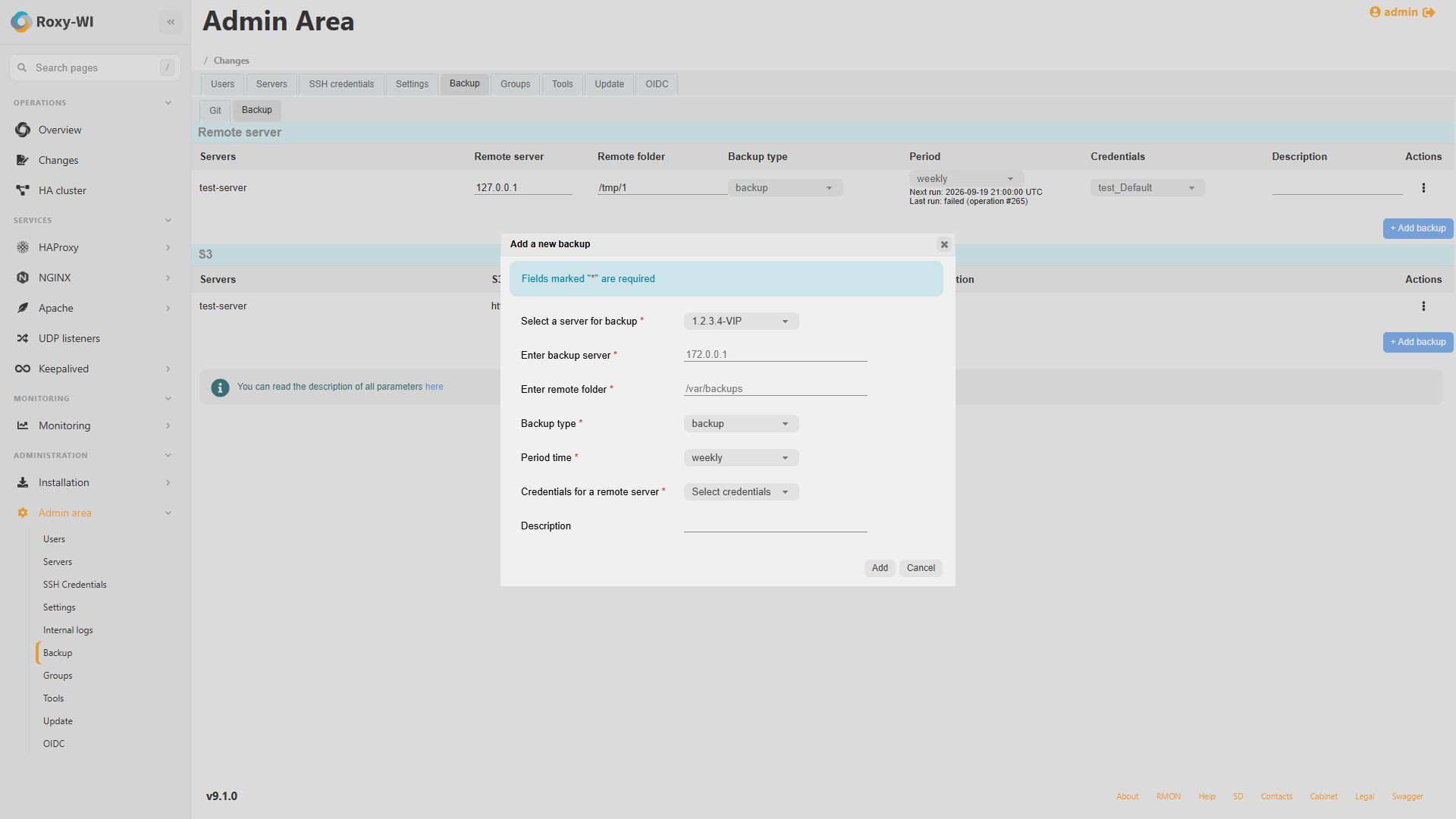
In the remote-server backup form, select the source server, destination and schedule.
| Field | How to configure it |
|---|---|
| Servers | The managed server whose saved configurations should be copied. |
| Remote server | The backup host reachable from Operations over SFTP on port 22. |
| Remote folder | A writable destination path. Files are stored below RPATH/roxy-wi-configs-backup/configs/SERVICE_DIR. |
| Backup type | Backup preserves versions removed locally. Synchronization uploads current files, then deletes only matching obsolete configuration files for this server. Other servers and unrelated files are retained. |
| Period | Hourly, daily, weekly or monthly; see the schedule rules below. |
| Credentials | The SSH credentials for the destination host. The SFTP server must support the OpenSSH posix-rename extension for atomic replacement. |
| Description | A label explaining the purpose or destination of this backup. |
Each file is uploaded to a temporary name before replacement. An interrupted upload does not truncate the existing destination file. Choose Synchronization only when deletion of obsolete remote versions is intended.
Backup to S3
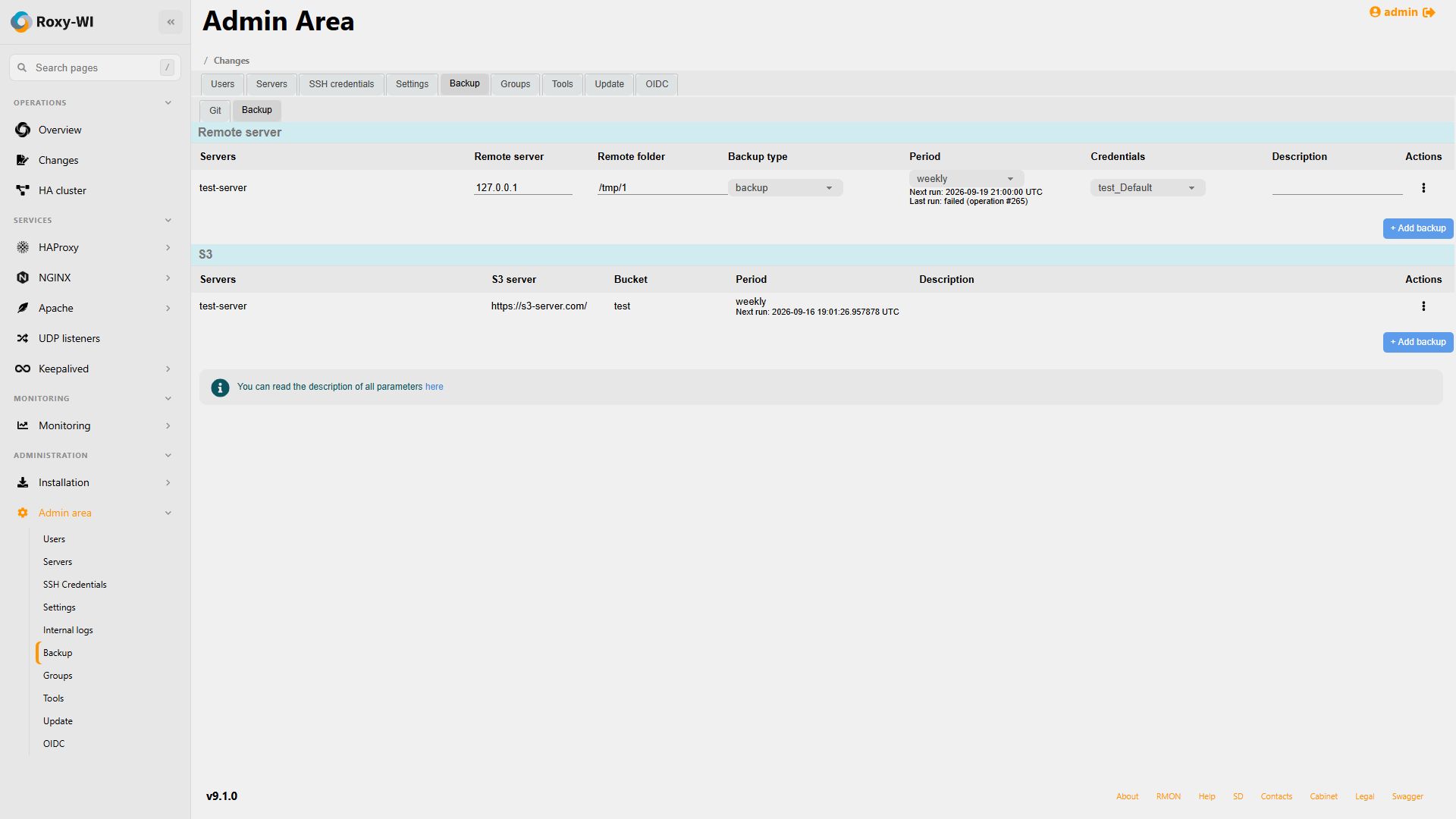
In the S3 form, select the source server and enter the endpoint, bucket, access key, secret key, period and description. Use an HTTP(S) origin without a path or embedded credentials; a bare hostname defaults to HTTPS.
Operations uses the Boto3 client installed with Roxy-WI. No package installation runs during a backup. The region defaults to us-east-1; set ROXYWI_BACKUP_S3_REGION on Operations when another region is required.
Objects keep the HOSTNAME/SERVICE_DIR/FILENAME layout. S3 backups preserve remote objects and skip unchanged objects previously written by this handler using SHA-256 metadata. Grant bucket/object read and upload permissions; bucket creation is needed only when the configured bucket does not exist.
Schedules, retries and history
Schedules survive process restarts. Hourly runs start on the hour, daily runs at midnight, weekly runs on Sunday and monthly runs on the first day. The host timezone is saved with each schedule. Set ROXYWI_BACKUP_TIMEZONE to an IANA name, such as Europe/Moscow, before creating or migrating schedules to override that timezone.
The Backup page shows Next run, the last result and its operation ID, or Waiting for schedule migration. API timestamps are UTC. After downtime, only one missed run is queued. Failures receive two retries, after 60 and 120 seconds; each attempt has an Operations record. After the third failed attempt, the next regular schedule is used.
Wait for queued or running work to finish before editing or deleting its backup configuration. If work remains queued, check Scheduler, RabbitMQ and Operations. For transfer failures, check saved source versions, credentials, network access and destination permissions.
Completed/failed backup operation history is retained for 30 days by default and pruned hourly. Set ROXYWI_BACKUP_HISTORY_RETENTION_DAYS on Scheduler to change the period; 0 disables cleanup. Active and latest tasks are retained. This removes database history, not saved configurations or remote backup files.
All Operations workers must share the saved configuration directories and lib_path on storage that supports advisory file locks. Keep lib_path/backup-locks available while workers run.
Migrate existing cron jobs
Imported filesystem/S3 schedules remain paused until the original cron jobs have been removed. Perform this cutover on the original package host, using the updated Roxy-WI environment and its database.
- Finish queued/running backup setup operations. Stop Web, Scheduler and Operations. Temporarily stop cron and wait for active backup transfers to finish.
- Install the updated requirements and apply database migrations with
python3 roxy_wi.py migrate, keeping the original configuration and encryption key. - As root, run
/path/to/roxy-wi-python roxy_wi.py migrate-backup-cron, replacing the interpreter path with the installation's Python environment. - Verify that migration completed on every former cron host sharing this database, then restart cron. If moving to containers, transfer the database and shared configuration storage, leave the source Roxy-WI processes stopped and start the destination processes.
The command backs up the root crontab with mode 0600 under lib_path/backup-cron-migration, removes only tagged Roxy-WI filesystem/S3 entries, verifies removal and activates their schedules. It can be rerun after an interruption. Keep the backup private: old S3 cron commands contain keys.
Do not run the cutover inside a container, which cannot inspect the original host's crontab. User cron entries, Git backups and certificate jobs are preserved. Certificate jobs have a separate migration procedure.