

Manage Docker and Podman services
Last updated: · Applies to Roxy-WI 10.0 and later.
Install or adopt managed proxy containers with an explicit engine, owner and mounts; operate their configuration, statistics and lifecycle from Roxy-WI.
Install a managed proxy
This guide covers services managed from Roxy-WI. To run the Roxy-WI application itself on Podman, use the separate controller deployment guide.
- Open Installation → Proxy service and select a registered server.
- Choose HAProxy, NGINX or Apache and select Runtime: Native / Docker / Podman.
- Review the selected version and installation options, start the operation and wait for completion.
- Check the actual service status and configuration before routing traffic.
New Podman proxies use rootful, host-network containers supervised by Quadlet. The host needs Python 3.9+, systemd, cgroup v2 and Podman 4.9+ with Quadlet from supported repositories. The installer refuses conflicting native services, unrelated containers/units and unowned configuration. It preserves configuration on repeated managed installations.
New Keepalived installation remains native. Existing rootless proxy containers can be adopted, but this installer does not create rootless users or their boot/network setup.
Adopt an existing container
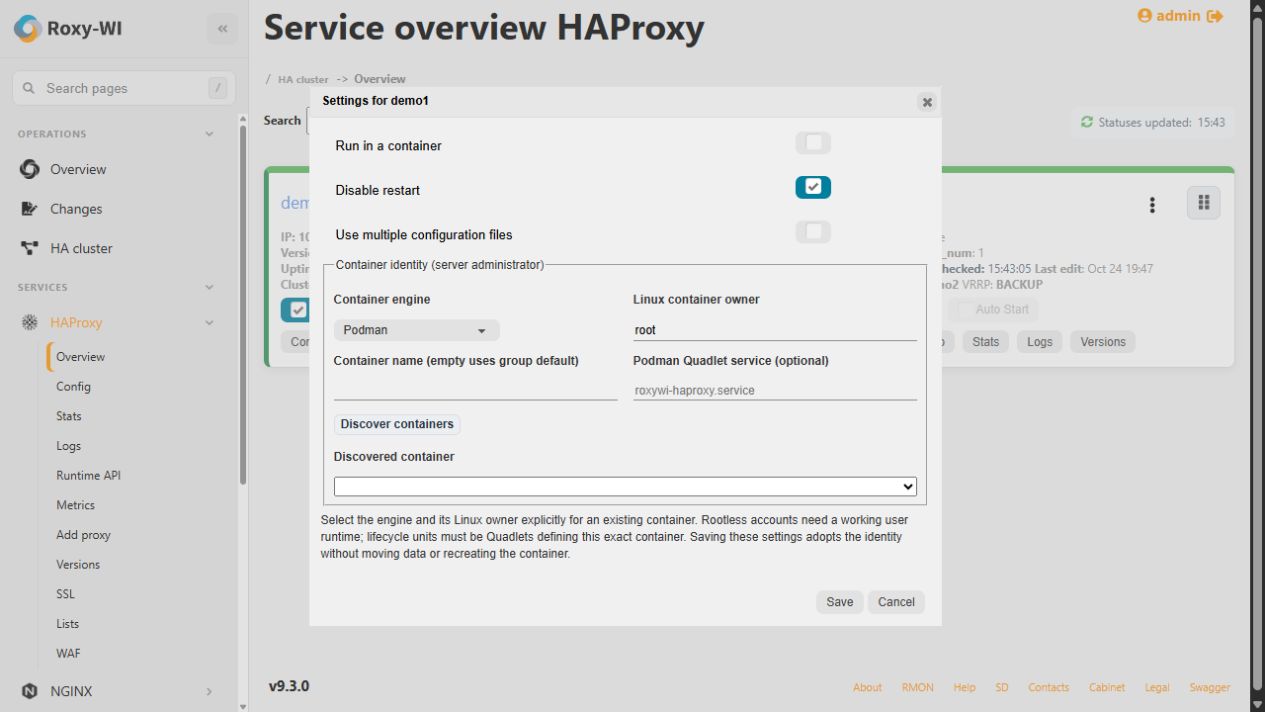
- Open the selected service's Settings as a server administrator.
- Choose Docker or Podman and the Linux container owner; use
rootfor a rootful container. - Select Discover containers, choose the exact container and review its mounts and optional lifecycle unit.
- Enable Run in a container and save. For HAProxy, verify the discovered startup configuration sources.
Saving a binding does not recreate or move the container. Roxy-WI does not fall back to another engine, owner or native service when that binding is unavailable. A lifecycle unit must be a matching Podman Quadlet; otherwise lifecycle uses the selected engine and boot policy remains the owner's responsibility.
Rootless owners need a functioning user manager/runtime. Statistics and Runtime API probes use a verified container network namespace over SSH; nsenter and non-interactive sudo must be available. Rootless Keepalived is not supported; adopted Keepalived requires rootful host networking and Keepalived as PID 1.
Configuration and certificates
Use writable directory mounts for configuration. Single-file mounts cannot follow atomic file replacement; read-only mounts cannot accept updates. Roxy-WI validates changes and reports restoration failures when rollback cannot complete. See configuration files for editing and version history.
New Podman installations use a service-specific certificate directory under /var/lib/roxy-wi/certificates/. Existing bindings retain their configured directory, which must be exposed through persistent mounts. Missing or ambiguous mounts are reported. Certificate replacement preserves existing SELinux labels; label-copy failure prevents success.
Lifecycle, ownership and troubleshooting
Use the normal service actions with the saved container binding. HAProxy graceful reload requires master-worker mode (-W/-Ws) with HAProxy as container PID 1. NGINX and Apache use their normal reload signals.
Pacemaker-owned applications must be controlled through cluster resource actions; independent proxy Auto Start and service actions must not compete with Pacemaker. For unsupported startup arguments or mounts, correct the binding and rediscover sources rather than assuming the host service is the container.
If a Podman image build fails, inspect Operations logs, DNS, outbound package access and host bridge forwarding. The installer does not disable SELinux or flush firewall rules. Witness containers have a separate installation and reviewed conversion workflow; selecting another engine is not a data migration.