

Corosync and Pacemaker clusters
Last updated: · Applies to Roxy-WI 10.0 and later.
Create or adopt a Linux HA cluster, manage resources and fencing, review configuration changes and monitor quorum in Roxy-WI 10.0.
Choose and register a cluster
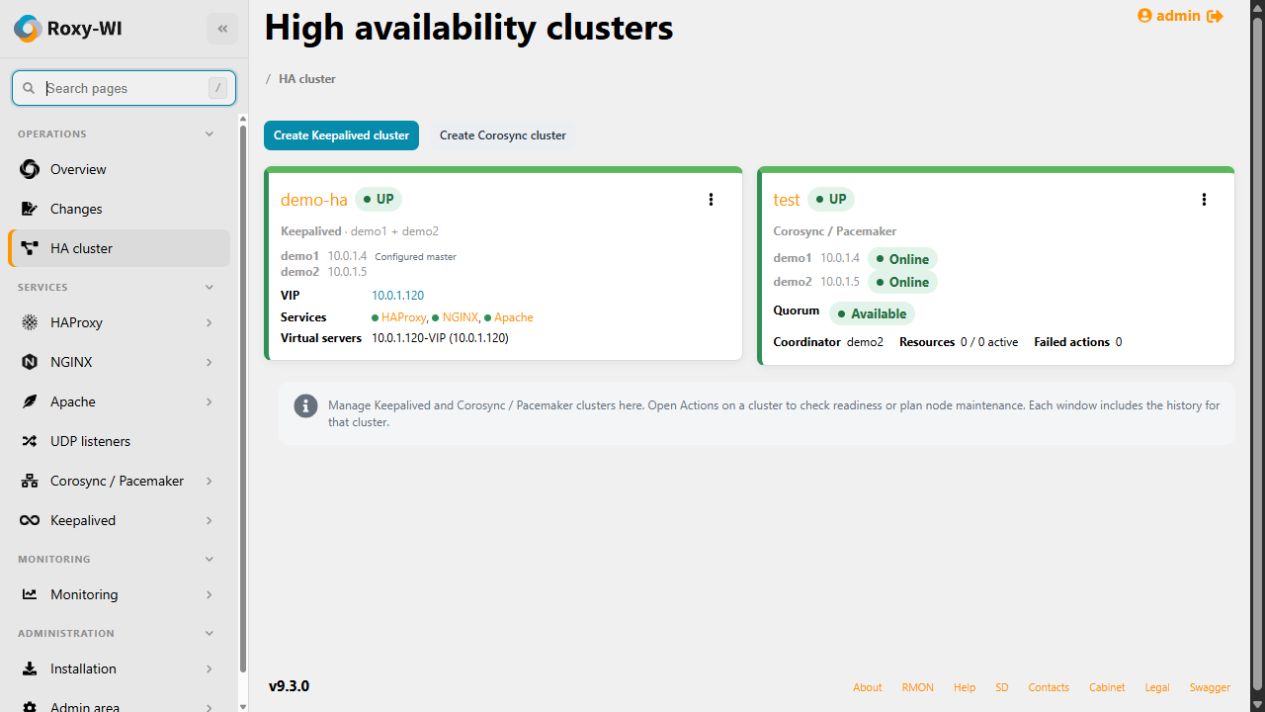
Open Operations → HA cluster for the shared Keepalived and Corosync/Pacemaker inventory. Select Create Corosync cluster to create a new cluster, add an existing one or install a separate quorum witness. Open a registered cluster through Services → Corosync / Pacemaker for status, resources, configuration, quorum, monitoring, logs and history.
Register the physical servers and SSH credentials in the same active group first. Managed nodes need Python 3.8+ as python3, SSH and non-interactive sudo. Web, Scheduler, RabbitMQ and Operations must be running. Cluster service access is required; roles 1–3 can operate clusters. Viewers can inspect status and history, but cannot read credential-bearing CIB snapshots or node journals.
Corosync handles membership and quorum; Pacemaker controls resources and recovery. Configure working fencing for your nodes. A quorum witness supplies a vote and does not replace fencing or application-data replication.
Recorded live checks cover Debian 13 and Rocky Linux 9.8. Use Check target platforms for each deployment: an available apt/DNF installation profile does not establish that every distribution version or workload has been qualified.
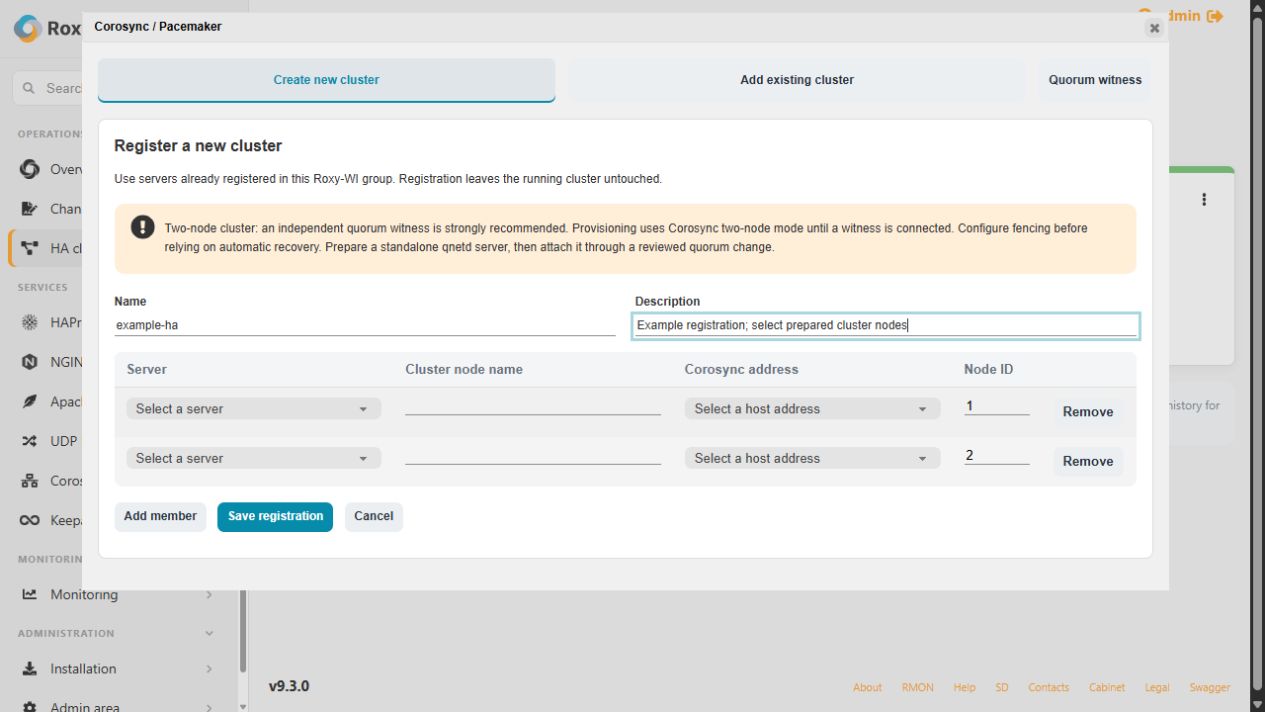
Create a new cluster
- Select Create new cluster to open Register a new cluster. Enter the cluster name and at least two distinct registered servers. Review each actual hostname, Corosync address and unique positive node ID.
- Select Save registration. This saves the plan without installing software. Select the registration and run Check target platforms.
- Choose optional SYN-flood protection or Proxmox fencing-agent installation only when required. Select Install cluster on empty nodes and confirm the cluster name.
- Follow Actions → Installation and logs. Wait for completed installation and verify online members and quorum before creating resources.
All nodes are checked before provisioning starts. The installer refuses active clusters, existing CIB/authentication keys and Proxmox hosts. EL installation needs the appropriate configured HA and CRB/PowerTools repositories; missing packages or entitlements stop the operation. Fencing stays enabled. Closing the dialog does not cancel an operation.
Add an existing cluster
- Select Add existing cluster and choose a running node.
- Review the discovered cluster name, membership, resources and quorum. Map every member to an enabled server in the active group.
- Confirm adoption after checking the mapping. Roxy-WI verifies node identities and matching configuration on every member, then stores the registration and an encrypted initial snapshot.
Adoption preserves running services, resources, authentication keys, transport and witness certificates. Discovery requires the standard Corosync configuration path and a nodelist of 2–32 members. Adopted clusters can use CIB changes, runtime controls and monitoring. Generated membership changes remain disabled until an explicit transport migration.
Resources, agents and reviewed changes
On Resources, open Add a resource or fencing device. Agent discovery queries every member; the selector offers only agents available on all nodes. Native metadata supplies required parameters, optional fields and suggested operation timings. Enter the actual VIP, dependencies, fencing targets and credentials for your infrastructure.
Forms support resources, groups, clones, promotable clones, location/order/colocation constraints and cluster properties. Use the complete CIB editor for advanced schema-supported configurations. To install missing agents, open Agents and repository packages, read repository packages, review per-node versions and confirm installation with the cluster name. A failed package job can leave earlier nodes updated; inspect the result and refresh the plan before retrying.
- Create and save a draft; review the current and proposed configuration.
- Run Validate and simulate and inspect the scheduler result.
- Select Apply reviewed change, confirm, and inspect resource state after completion.
Editing candidate XML invalidates its review: save and validate a new draft. Configuration changed through another tool invalidates a stale digest. History restoration creates a new draft against current state. An interrupted apply is not replayed automatically.
| Control | Effect |
|---|---|
| Standby / Online | Change node eligibility. For planned host work, use reviewed node maintenance. |
| Enable / Disable / Restart | Control the resource or enclosing wrapper through Pacemaker. |
| Move / Clear | Add or remove a temporary placement preference; other constraints still apply. |
| Cleanup | Clear failure history and request new probes; this can allow a failed resource to start. |
| Cluster maintenance mode | Suspend normal resource management; this does not drain a node. |
Membership and quorum
On Quorum, load current membership. Keep existing names, addresses and IDs unchanged. Add an empty registered host, or remove a standby member after its resources have drained. All current members must be reachable and quorate, and each change must retain at least one existing member. Review and validate the generated Corosync configuration before applying it.
When a witness is selected, every resulting member must report that witness, active TLS and a vote before the change is confirmed. Partial or uncertain changes require reconciliation; Roxy-WI does not force quorum or automatically roll back a coordinated membership change. Follow the quorum witness guide for installation, attachment, conversion and trust recovery.
Migrate an adopted transport
Quorum → Planned migration to managed Corosync transport replaces custom transport settings with the reviewed authenticated knet configuration. Schedule application downtime.
- Review the complete current/proposed files and token timeout.
- Select Quiesce applications and confirm the cluster name. All members enter standby and managed resources must stop.
- Review again, then select Apply reviewed transport. Private backups and host recovery timers protect the switch; existing membership, authentication keys and TLS witness identity are retained.
- Verify quorum and witness votes, then explicitly select Resume previous nodes. Previously standby nodes stay in standby.
Use Recover original transport for an interrupted switch. Host timers restore the old transport but leave Pacemaker stopped; finish coordinated recovery in the GUI before resuming nodes. Changing the witness host or CA is a separate reviewed workflow.
Monitoring and recovery
Enable cluster monitoring for health-change and recovery notifications through the existing group/server alert routing. Repeated unchanged states are deduplicated. Use HA readiness for per-member evidence and declared failure domains.
Under Installation → Monitoring → Corosync / Pacemaker Exporter, install the exporter on each member. Check metrics and show Prometheus target verifies the endpoint and provides scrape configuration; add that configuration to your Prometheus server yourself.
Monitoring → Auto Start for cluster daemons reads effective systemd policy and offers package defaults, restart on failure or no automatic restart. Applying a policy updates managed drop-ins without restarting services. Use Pacemaker resource controls for cluster-owned proxies.
If an operation remains queued, check worker diagnostics. For installation failures read installation logs; for running services read node journals. For a stale draft, reload and review current state. For an unknown apply, compare every node with the recorded previous/proposed state before another write. Keep the database and encryption key backed up together, alongside node configuration and witness keys.