

HA readiness audits
Last updated: · Applies to Roxy-WI 10.0 and later.
Inspect Keepalived and Pacemaker membership, quorum, witness votes, VIP ownership and failure domains without changing the cluster.
Run a readiness audit
- Open Operations → HA cluster and select Actions → HA readiness on a Keepalived or Corosync/Pacemaker card.
- On Check, select Run readiness audit.
- Wait for the Operations job, inspect each result and open History for previous audits. Use Settings for declared failure domains.
Closing the dialog does not cancel the job. Only one audit per cluster may be queued/running at a time. Cluster service access applies throughout; operators at roles 1–3 can run audits and administrators at roles 1–2 can edit domain labels and external-test records.
The audit reads the cluster. It does not move resources, stop services, trigger fencing or perform a failover test.
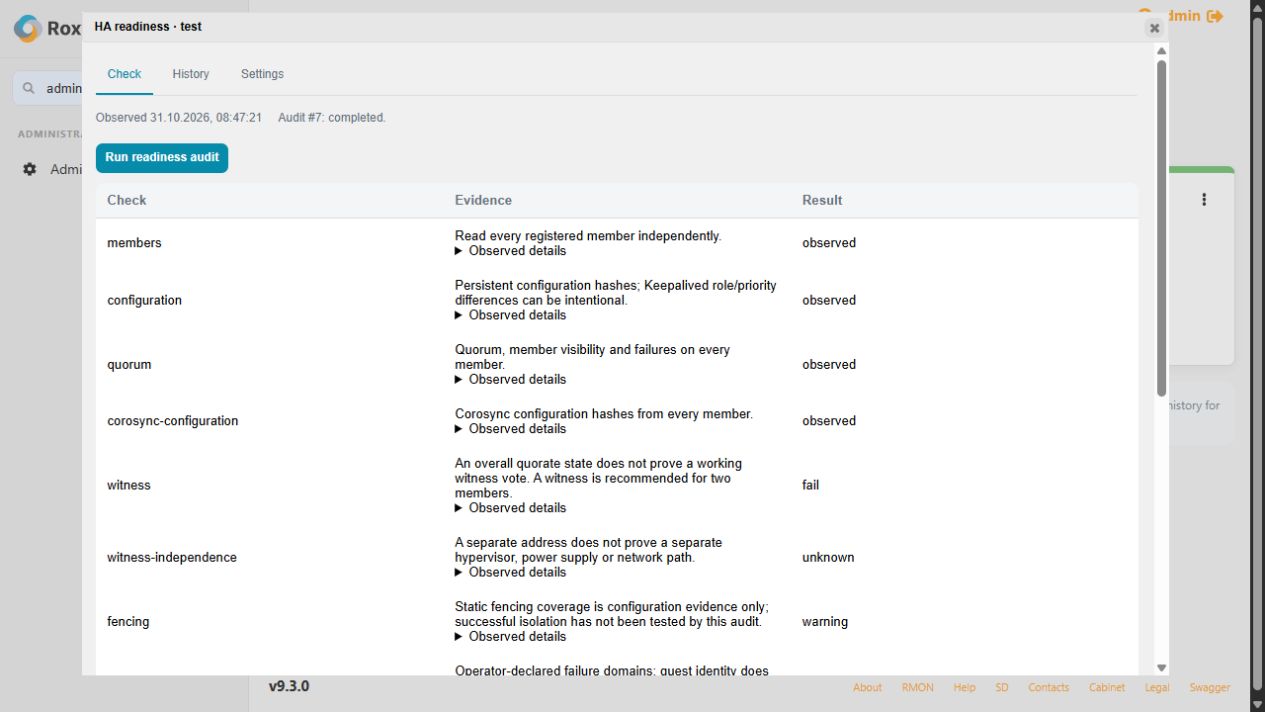
Understand the evidence
| State | Meaning |
|---|---|
| Observed | A current read matched the expected condition. |
| Configured | Configuration describes a capability; its operation was not tested. |
| Declared | An administrator supplied the information. |
| Unknown | Evidence is unavailable or outside the check's scope. |
| Warning / Fail | Inspect the reported condition before relying on HA. |
| Not applicable | The selected technology does not provide that mechanism. |
Pacemaker checks member identity, configuration consistency, quorum, per-member witness TLS/votes and static fencing coverage. Keepalived checks the primary configuration, process state and observed VIP ownership. Unreachable members prevent a claim of single VIP ownership. Included Keepalived files remain outside the primary-file comparison.
Quorum is not proof of partition safety; configured fencing is not proof that a device can isolate a host. Keepalived does not acquire Pacemaker-style quorum or fencing through this audit.
Record failure domains and external tests
In Settings, declare each member's and matched witness's hypervisor, power, uplink and storage domains. Shared labels highlight dependencies; empty fields stay unknown. A different IP or VM identity does not establish physical independence.
Record a separately performed switchover, fencing or partition test with its date, result, procedure and evidence reference. It remains an operator attestation tied to the reviewed membership and configuration. A completed planned drain and return is recorded separately as an observed maintenance result.
History, drift and unavailable evidence
Reports are encrypted and tied to the cluster registration and server identities. Configuration changes mark earlier evidence as stale. Deleting and recreating a cluster does not make its old evidence apply to the new registration.
Restore access for unreachable members, reconcile mismatched configuration and resolve witness/fencing warnings before running a fresh audit. A failed or incomplete read remains unknown; retrying a check does not convert missing evidence into success. If the job stays queued, inspect Operations worker and queue health.