

Quorum witness installation and recovery
Last updated: · Applies to Roxy-WI 10.0 and later.
Install a native, Docker or Podman quorum witness, attach a TLS vote and use reviewed conversion, image refresh and host or CA migration.
Install an independent witness
A Corosync net qdevice uses a separate qnetd witness to arbitrate votes. Keep it outside the cluster members and in an independent failure domain. Permit member access to TCP 5403 and retain working fencing.
- Register the witness host and SSH credentials in the active group.
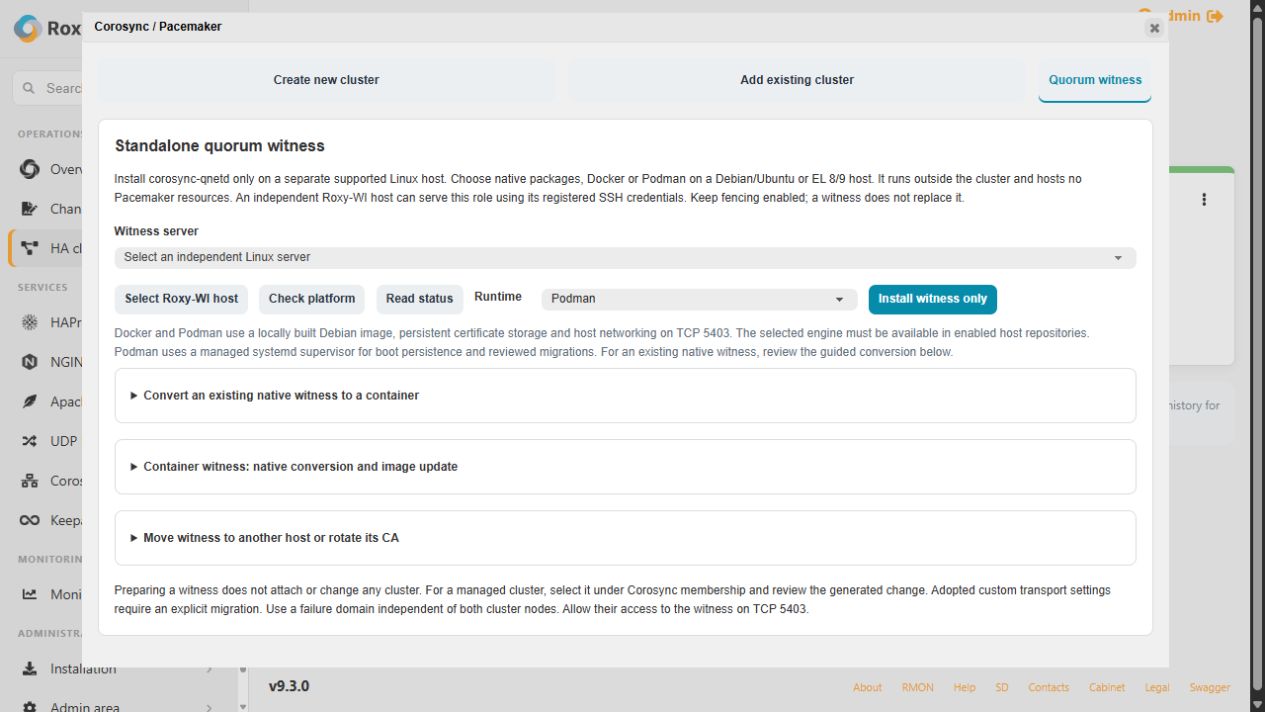
- Open Operations → HA cluster → Create Corosync cluster → Quorum witness.
- Select the host, check its platform and choose Native, Docker or Podman.
- Select Install witness only, follow the operation and read its status.
The host must not be a registered cluster member or run active Corosync/Pacemaker. The installer provisions qnetd only; it does not attach a cluster. An independent Roxy-WI host can serve as the witness through its own registered SSH connection. Behind a reverse proxy, select the actual host explicitly.
Container modes build the fixed qnetd image and retain its certificate database under /var/lib/roxy-wi/qnetd/data. Podman uses a managed systemd supervisor. Image builds need working DNS and package access; host firewall and forwarding policy remain operator configuration.
Attach and verify the vote
For a managed cluster, open Services → Corosync / Pacemaker → Quorum, load membership and select the independent witness. Review the generated configuration, validate and apply. The worker installs/configures qdevice, distributes certificates and requires TLS.
Verify the chosen witness address, TLS and a witness vote on every member. A running qnetd service or overall cluster quorum alone is insufficient. Adopted custom clusters retain their existing transport; use the planned transport migration before generated membership changes. Changing an already configured witness's host or CA needs the explicit trust workflow below.
Convert the runtime or refresh its image
- Select the existing native witness and destination Docker/Podman engine. Expand Convert an existing native witness to a container.
- Select Review migration. Check the CA fingerprint and attached clusters; all clients must belong to registered, reachable, quorate clusters with TLS votes.
- Select Convert to selected engine and confirm the server name. Preparation checks a copy of the NSS database before stopping the native service.
- Wait for verification of every client's vote and the final committed result.
The host, address, port and CA stay the same. A 180-second host recovery timer restores the original witness if the switch or controller fails. Use Recover native witness for unfinished conversion and inspect witness logs.
The witness lifecycle controls also provide reviewed conversion back to native packages and image refresh from the fixed recipe. They retain the old runtime/database for recovery. Use Recover original witness for an unfinished lifecycle change. Installing again with another engine is not an implicit Docker-to-Podman migration.
Move the witness or rotate its CA
Expand Move witness to another host or rotate its CA. For a host move, install an empty independent target first. Alternatively select CA rotation on the current host.
- Run Review witness trust change. Check both CA identities, all affected clusters and clients, and the recovery plan.
- Select Apply reviewed trust change and confirm the source name. Nodes generate new client keys locally; the source CA private key is not copied to another host.
- Inspect TLS and votes on every member before accepting completion.
All attached clusters must be registered in the active group, online and healthy. A host move preserves the target CA and changes the witness address while retaining custom transport. Workloads continue running, but the witness connection is interrupted during the change.
Recover an uncertain change
Review the unfinished operation again and use its recovery control. During a failed cross-host trust move, timers stop the target and restore client files while leaving qdevice and the original remote source stopped. Use Recover original trust: it first confirms the target is stopped, then restores the source and clients and verifies votes. An unreachable target prevents source reactivation.
Do not independently start both witnesses after an uncertain move. Pending changes block other cluster writes. Preserve private host journals and backups under /var/lib/roxy-wi/qnetd/ and client trust backups under /var/lib/roxy-wi/qdevice-trust/. A committed move needs a new reviewed change to reverse it.
For missing votes, inspect TCP 5403 reachability, clocks, qdevice/qnetd journals and certificate trust on each member. Continue with HA readiness once the cluster is healthy.