

External certificate sources and CertWarden
Last updated: · Applies to Roxy-WI 10.0 and later.
Retrieve CertWarden certificates, schedule HAProxy deployment and recover per-target updates, including active and passive Pacemaker members.
Connect an external source
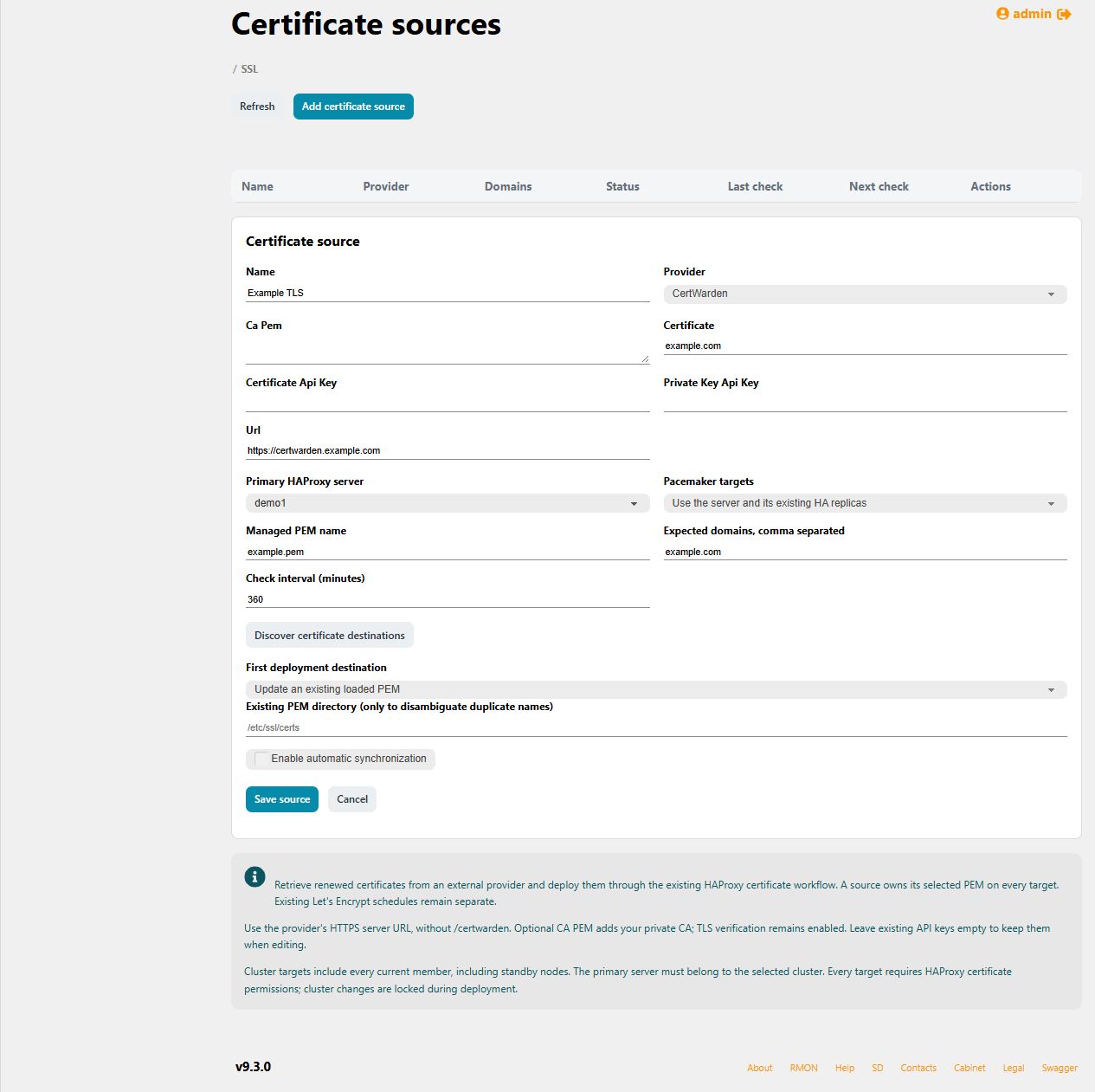
Open Services → HAProxy → SSL certificates → External certificate sources. CertWarden is the current provider. Roxy-WI retrieves a certificate and key and deploys them through its existing certificate transaction workflow. Issuance and renewal at the provider remain the provider's responsibility.
Use an operator account with HAProxy permission; Pacemaker targets also require cluster permission. Scheduler and Operations must be available. Protected-host restrictions and direct-deployment policy apply, including to scheduled runs under the owner's current permissions. A Change Center-only policy blocks direct synchronization.
Configure and check the provider
- Add a source with its name and CertWarden HTTPS server URL, without the
/certwardenpath. - Enter the certificate name, certificate API key and private-key API key. For a private issuing CA, provide its PEM trust chain.
- Select the primary HAProxy server. Its linked Master/Slave targets are included by default; optionally select a Pacemaker cluster containing the primary.
- Set the PEM filename and expected certificate domains. For a loaded certificate, use its existing name and exact directory when needed. For a new PEM, use Discover certificate destinations and select a loaded directory or crt-list.
- Save and run Check provider. Inspect the result before enabling deployment.
The check validates retrieval, key/certificate matching, validity dates and expected domains without writing managed hosts. TLS verification is mandatory. Saved API keys are encrypted and omitted from read responses; leaving a key blank during editing keeps its existing value.
Synchronize and schedule
Select Synchronize for immediate deployment, or enable periodic synchronization. The interval is 5–10,080 minutes and defaults to six hours. Saving a source does not prove successful deployment. Inspect the source status and per-target results in the primary server's certificate History.
A source reserves its PEM on every target, even when disabled. Another source or Let's Encrypt schedule cannot own the same PEM on overlapping targets. Remove the previous owner before switching managers. Removing the source stops its schedule and leaves deployed files in place.
Unchanged material is skipped only when the complete accepted PEM and target state still agree. A changed chain, target drift or changed membership is not silently accepted. Provider errors leave working certificates untouched and retry on the configured interval.
Active and passive Pacemaker members
All current members, including standby members, are targeted. The cluster must be quorate, online and clean, with an unambiguous managed HAProxy resource and at least one active instance. Roxy-WI discovers runtime state from an active member even if the configured primary is passive.
| History result | Meaning |
|---|---|
| Active: Runtime verified | The running HAProxy received the certificate through the Runtime transaction. |
| Passive: file staged and startup configuration validated | The stopped member received the PEM and passed offline startup validation; its service was not started or moved. |
Supported passive bindings include static native HAProxy resources and supported rootful Docker, Podman or Quadlet bindings with resolvable directory mounts. Dynamic bindings and rootless passive resources are refused. File staging does not prove a client TLS handshake; use request diagnostics and a separately planned failover check.
Recover a failed deployment
Read each target's history. Failed deployment attempts use the recorded transaction journals for rollback. Incomplete rollback or finalization exposes Retry deployment recovery; this retries the recorded recovery without fetching a new certificate. Edits and removal remain blocked while work is unfinished.
If resource placement changes, recovery checks current placement against the original configuration and identities. A newly active member may need an explicitly reviewed drain before an unsafe certificate removal can be recovered. Do not delete journals or overwrite unknown external changes.
An unavailable server/cluster binding stays visible. Edit it to choose a valid target, or remove the source after completing any outstanding recovery. Back up the database with its original credential encryption key. Continue with the certificate catalog and history guide for manual uploads and runtime operations.