

Metrics service description
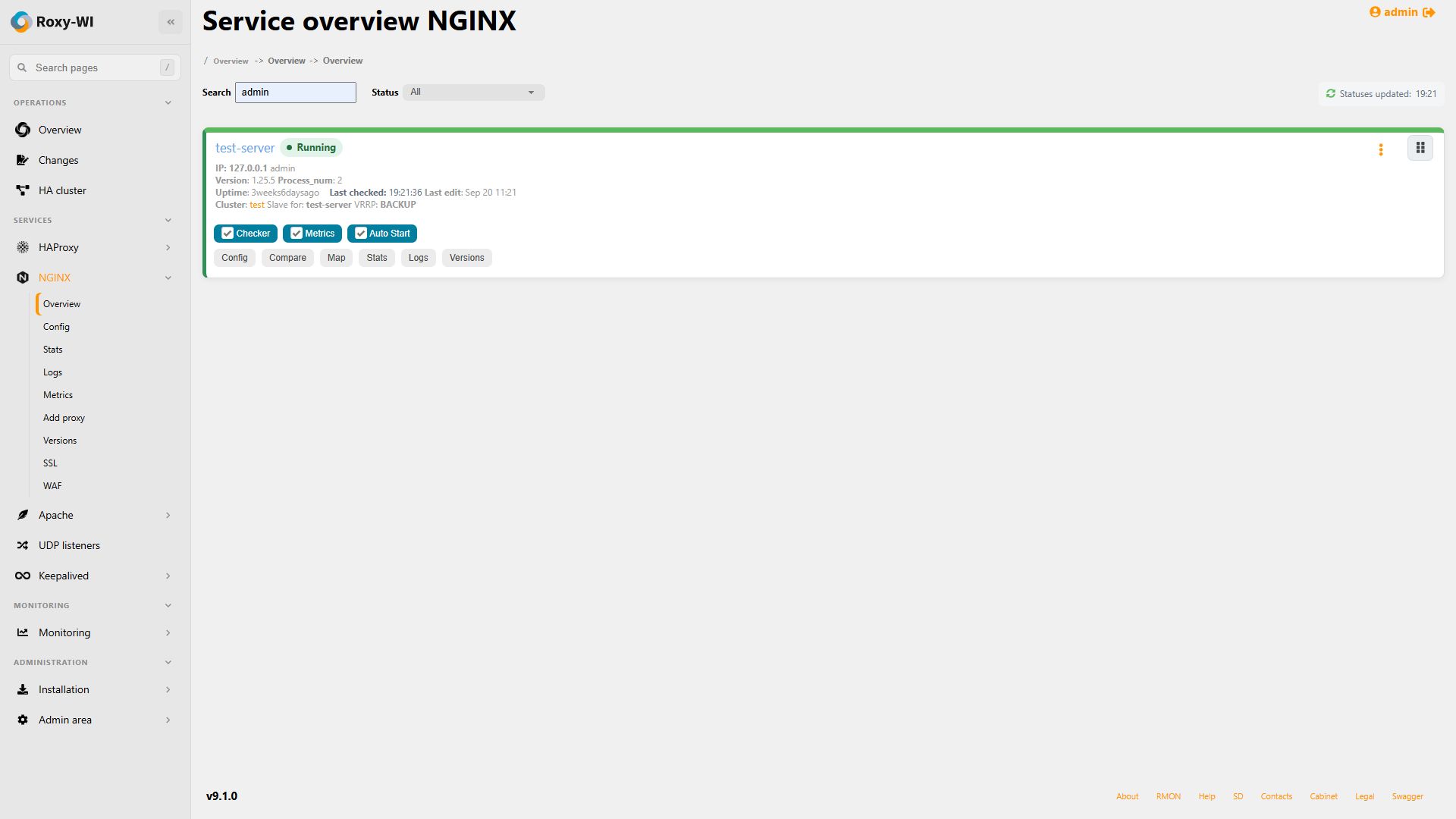
Metrics 4 is one standalone, long-running worker. It replaces metrics_master.py and the separate HAProxy, NGINX, Apache and
WAF worker processes. Roxy-WI sends desired assignments through RabbitMQ; Metrics collects samples and publishes them back to Roxy-WI.
It never imports Roxy-WI or writes directly to the Roxy-WI database.
Metrics collects:
- HAProxy current and SSL connections, session rate and HTTP response counters;
- NGINX and Apache current connections;
- HAProxy WAF backend connections.
Enable or disable collection for each server with the Metrics checkbox in its Overview settings. The Roxy-WI scheduler publishes the assignment, and any available Metrics replica can claim it. Samples are stored in the existing Roxy-WI graph tables.

# EL/RHEL-compatible systemssudo dnf install roxy-wi-metrics# Debian/Ubuntusudo apt updatesudo apt install roxy-wi-metrics# Run after metrics.env is configured on a standalone hostsudo systemctl enable --now roxy-wi-metricssudo systemctl status roxy-wi-metrics
The package does not require Roxy-WI on the same host. Runtime options are stored in /etc/roxy-wi/metrics.env. The default
auto mode reads RabbitMQ settings from a local Roxy-WI installation when available. On a worker-only host, set
METRICS_USE_ROXYWI_RABBITMQ_SETTINGS=0, provide all METRICS_RABBITMQ_* connection values and then start the unit.
Keep the package's SQLite database for one replica or configure a shared Metrics database for HA.
Create a root-readable /etc/roxy-wi/metrics.env file:
METRICS_DATABASE_URL=sqlite:////var/lib/roxy-wi/metrics/metrics-state.dbMETRICS_RABBITMQ_HOST=rabbitmq.internalMETRICS_RABBITMQ_PORT=5672METRICS_RABBITMQ_VHOST=/roxy-wiMETRICS_RABBITMQ_USER=roxy-wiMETRICS_RABBITMQ_PASSWORD=GENERATED_STRONG_PASSWORDMETRICS_RABBITMQ_QUEUE_TYPE=classicMETRICS_INSTANCE_ID=metrics-1METRICS_CAPACITY=20
sudo chmod 600 /etc/roxy-wi/metrics.envdocker volume create roxy-wi-metrics-datadocker run -d --name roxy-wi-metrics --restart unless-stopped --stop-timeout 45 \--env-file /etc/roxy-wi/metrics.env \--mount source=roxy-wi-metrics-data,target=/var/lib/roxy-wi/metrics \ghcr.io/roxy-wi/roxy-wi-metrics:4.0.0
For Compose or Kubernetes, put RabbitMQ credentials in a Secret, mount persistent storage and use a controlled rollout. Pin
4.0.0 or another tested version instead of relying on latest.
METRICS_CAPACITYlimits the number of assignments claimed by one replica.METRICS_HEARTBEAT_SECONDSdefaults to 10 seconds; the worker state is displayed on Overview and Admin area => Tools.METRICS_RABBITMQ_QUEUE_TYPEmust matchROXYWI_RABBITMQ_QUEUE_TYPE.- All replicas in one pool share
roxy-metrics.commands; do not create a queue for every pod.
SQLite is supported for one Metrics instance. For two or more replicas, set the same MySQL/MariaDB
METRICS_DATABASE_URL on every replica, for example mysql://metrics:password@metrics-db:3306/metrics.
The Metrics schema must be separate from the Roxy-WI and Checker schemas.
HAProxy is queried through its configured TCP statistics socket. NGINX and Apache use their statistics HTTP endpoints. If the worker
runs on another server, replace loopback addresses such as 127.0.0.1 in Roxy-WI with addresses reachable from the worker network.
# Package/usr/bin/python3 /usr/lib/roxy-wi-metrics/package_metrics.py --versiontail -f /var/log/roxy-wi/metrics.logjournalctl -u roxy-wi-metrics -f -o cat# Containerdocker run --rm ghcr.io/roxy-wi/roxy-wi-metrics:4.0.0 --versiondocker logs -f roxy-wi-metrics
In Roxy-WI 9.1.0, samples are written directly to graph tables with duplicate-delivery identifiers in those rows; a second full JSON copy is not stored for every sample. Out-of-order samples within the retained history are accepted. Graph retention remains three days, and messages older than the completed retention cleanup are not reinserted.
Package and container logs use the same newline-delimited JSON format. Pipe the output through jq when a formatted view is useful.
Version 4.0.0, a fresh heartbeat and the active assignment count must appear in Roxy-WI. New samples should then appear in
the existing Metrics graphs. A running worker with zero assignments usually means collection is disabled, the subscription is inactive,
or the Roxy-WI scheduler has not completed its next one-minute reconciliation cycle.
Package-installed Metrics can be updated with the package manager or from Admin area => Update. For containers and Kubernetes, change the pinned image tag and perform a Compose or Kubernetes rollout. Roxy-WI does not update remote container images.
See the distributed-services update guide before replacing an old Metrics master.