

Deploy and operate Roxy-WI 9.1
Applies to Roxy-WI 9.1 and later.
Deployment choices
Roxy-WI 9.1 supports Linux packages, Docker Compose and Kubernetes with separate Web, Scheduler, Service Events and Operations processes. Use the same database, application storage and credential encryption key across these roles.
Choose Linux packages for a host installation, the local quick start below for evaluation, or Compose/Helm for a container deployment. Installing the application does not activate a subscription. See plans and feature availability for managed services, OIDC and Change Center.
Try locally with HTTPS
Install Git, Python 3.10 or newer, Docker with Linux containers and Docker Compose 2.24.4 or newer. Keep local port 8443 free and allow the build to download dependencies. Run:
git clone https://github.com/roxy-wi/roxy-wi.git
cd roxy-wi
python3 docker/quickstart.py start
python3 docker/quickstart.py password
On Windows, use py -3 in place of python3 if needed. Open https://localhost:8443 and sign in as admin with the generated password. The local HTTPS certificate initially has an untrusted issuer; accept it for this local evaluation. The launcher does not change your machine's trust store.
The launcher builds the checkout, runs migrations and starts all four roles, RabbitMQ and the HTTPS proxy in the separate roxywi-quickstart Compose project. It publishes only the proxy on loopback.
python3 docker/quickstart.py status
python3 docker/quickstart.py logs
python3 docker/quickstart.py stop
stop preserves volumes and docker/.env.quickstart; start reuses them. Keep that file with the database because it holds the encryption key. The local stack has no demonstration servers: add SSH credentials and a test server reachable from the Docker network. Inside a container, localhost refers to that container.
Deploy with Docker Compose
The repository contains MariaDB and SQLite manifests. These build the application from your checkout. The following commands use docker/docker-compose.yml (MariaDB); keep the same project name, manifest and environment file for later commands.
- Copy
docker/.env.exampletodocker/.env. Replace every placeholder with unique secrets, including an application secret of at least 32 characters. Keep the file private and out of version control. - Generate a Fernet key for
ROXYWI_SECRET_PHRASEwith the command below. For an existing database, preserve its current key instead. - Set
ROXYWI_PUBLIC_URLto the external HTTPS origin without a trailing slash. Put Web behind an HTTPS reverse proxy, restrict published port 8080 to that proxy and configure proxy trust for your network. Authentication cookies require HTTPS. - Build and start the stack; migration must finish successfully before the application roles start.
python3 -c "import base64, os; print(base64.urlsafe_b64encode(os.urandom(32)).decode())"
docker compose --project-name roxy-wi --env-file docker/.env -f docker/docker-compose.yml up --build --detach --wait --wait-timeout 300
docker compose --project-name roxy-wi --env-file docker/.env -f docker/docker-compose.yml exec -T web cat /var/lib/roxy-wi/bootstrap-admin-password
Log in as admin using the initial password, then change it. The password file does not track later changes. Named volumes retain application files, database data and RabbitMQ state. Do not remove volumes when stopping an installation you intend to keep. Bind mounts must be writable by UID/GID 10001, used by the default application image.
Deploy with Helm
Build an application image from the checkout and publish it to a registry available to the cluster. Use helm/roxy-wi and review its values.yaml. Set image.repository and image.tag to your image.
Provide an external database, RabbitMQ, persistent storage and HTTPS ingress; the chart does not install a database or broker. Use existingConfigSecret for a private configuration, rabbitmq.existingSecret for broker settings and persistence.existingClaim for existing storage. Set config.main.public_url to the public HTTPS origin.
helm lint helm/roxy-wi -f /secure/path/roxy-wi-values.yaml
helm template roxy-wi helm/roxy-wi --namespace roxy-wi -f /secure/path/roxy-wi-values.yaml
helm upgrade --install roxy-wi helm/roxy-wi --namespace roxy-wi --create-namespace -f /secure/path/roxy-wi-values.yaml --wait --timeout 10m
Keep rendered manifests private because they can contain secrets. The migration Job initializes the schema; application init containers wait for database readiness. Stop application writers during schema upgrades. For multiple Web replicas, use MariaDB/MySQL; keep one Web replica with SQLite. Multi-node deployments need shared storage with advisory file locks and compatible volume access/pod placement.
Processes, health and queued work
| Role / command | Responsibility |
|---|---|
python3 roxy_wi.py web | Run the Web interface and API with Gunicorn. |
python3 roxy_wi.py scheduler | Queue scheduled work, retries, notifications and reconciliation. Run exactly one Scheduler; do not enable it inside Web workers. |
python3 roxy_wi.py service-events | Consume service events and update recorded worker/service state. |
python3 roxy_wi.py operations | Execute queued work and store progress/results, including service installation, backups, certificates and Change Center actions. |
python3 roxy_wi.py migrate | Apply database migrations and exit before starting application roles. |
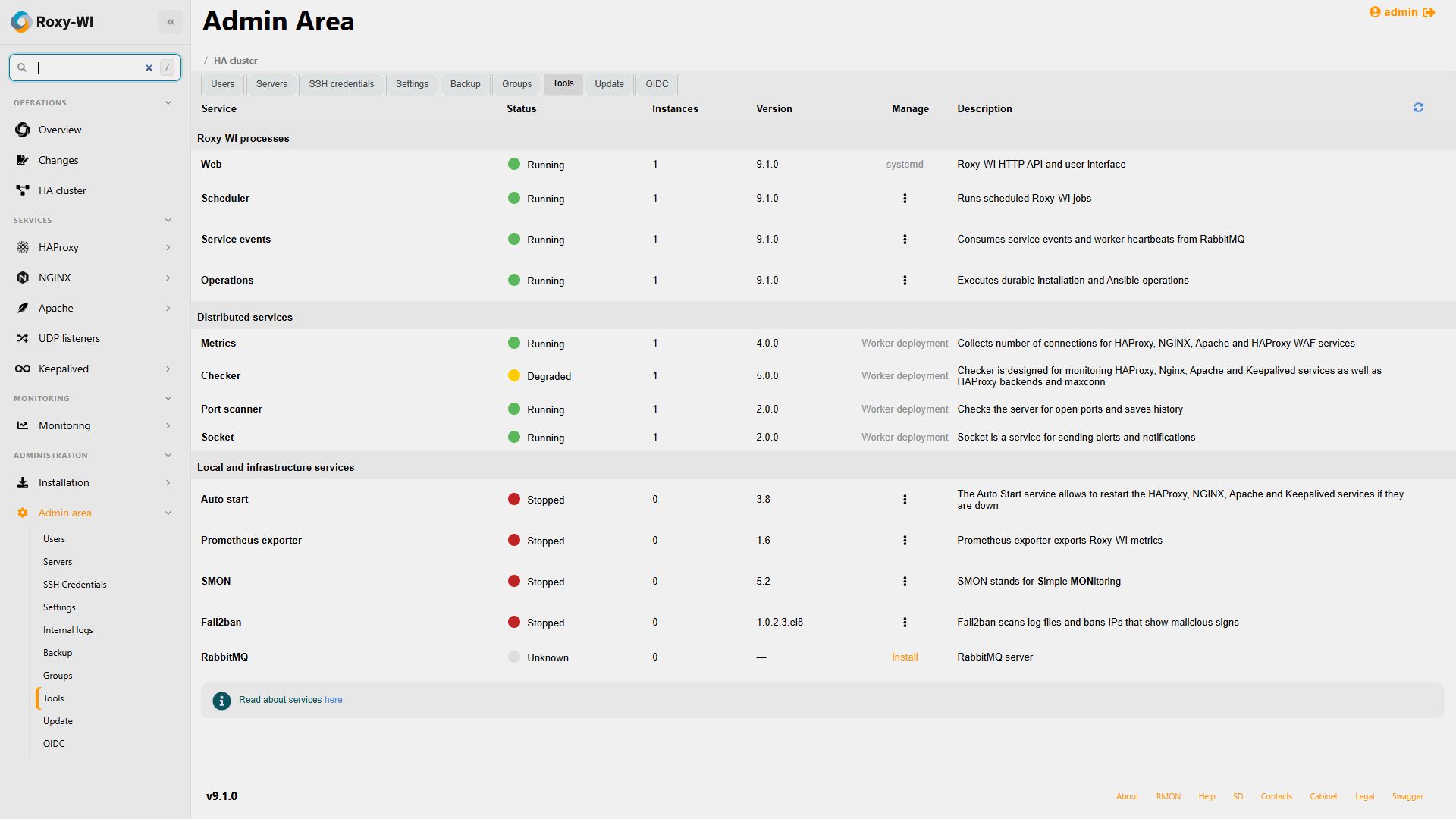
Packages and container manifests supervise these roles. RabbitMQ carries background work. A Web restart does not discard queued operations. Overview and Admin Tools show runtime versions, replica counts, assignments and stale heartbeats; container processes are managed through Compose or Kubernetes.
docker compose --project-name roxy-wi --env-file docker/.env -f docker/docker-compose.yml ps
docker compose --project-name roxy-wi --env-file docker/.env -f docker/docker-compose.yml logs --tail 100 web scheduler service-events operations
docker compose --project-name roxy-wi --env-file docker/.env -f docker/docker-compose.yml exec -T operations python3 roxy_wi.py healthcheck --role operations --check ready
Web exposes /health/live and /health/ready. Probe background roles separately with their role name; Web readiness alone does not prove that scheduled work can run. If operations remain queued, check RabbitMQ and Operations; if no scheduled work appears, check Scheduler, next run/retry, timezone and migration status. Use Internal logs and Live for diagnosis.
Restart and update
To restart the installed Compose stack without changing its image or environment:
docker compose --project-name roxy-wi --env-file docker/.env -f docker/docker-compose.yml restart web scheduler service-events operationsFor a code update, place the intended source revision in the checkout, let active operations finish and take a consistent backup. Run the following commands in order, proceeding only when each succeeds:
docker compose --project-name roxy-wi --env-file docker/.env -f docker/docker-compose.yml build
docker compose --project-name roxy-wi --env-file docker/.env -f docker/docker-compose.yml stop web scheduler service-events operations
docker compose --project-name roxy-wi --env-file docker/.env -f docker/docker-compose.yml run --rm migrate
docker compose --project-name roxy-wi --env-file docker/.env -f docker/docker-compose.yml up --detach --wait --wait-timeout 300
Keep application roles stopped if migration fails and resolve the reported error before continuing. A restart alone does not apply new images or environment values; recreate the containers. Preserve the original secrets and database.
When upgrading a package installation with cron-managed jobs, complete the backup cutover and certificate cutover on the source hosts before enabling destination schedules. See the package update guide for the 9.1 checklist.
Preserve and restore application state
For disaster recovery, preserve a consistent database backup, the entire configured lib_path, saved configuration directories, configuration/environment secrets and the credential encryption key. Include private Let's Encrypt state and pending deployment recovery files. Preserve RabbitMQ state or prepare a documented recovery procedure for its durable queues.
Stop application writers before a filesystem snapshot. Use database-native backup tools for MariaDB/MySQL. For SQLite, use its backup API or copy the database with all writers stopped; copying only the main live file can miss WAL contents.
Restore matching database, files and keys with the required ownership. Start dependencies, apply the intended version's migrations and check each role's readiness before admitting traffic. Inspect interrupted Operations and certificate recovery before enabling scheduled work. Test restoration on a separate installation.